If you are a photographer who has just returned from a shoot with a lot of Fujifilm camera images, only to discover they are corrupted or damaged. The stress of potentially losing professional work or cherished personal memories can be overwhelming.
Thankfully, there are specific ways and resources through which you can repair and get back your essential data in no time. In this article, we will discuss various Fujifilm camera repair methods that are effective.
Part 1. Fujifilm Images: Why They Matter and What Can Go Wrong
Fujifilm produces a line of digital cameras that capture images in a proprietary RAW file format called RAF. The RAF file basically acts like a digital negative, preserving every nuance of the shot with greater detail. This makes Fujifilm’s RAF files invaluable to professional photographers who want complete control over post-processing. Beyond professionals, many hobbyists and families treasure Fujifilm photos for personal memories.
Common Problems with Fujifilm Images
- File Corruption/Damage: Fujifilm RAF files might be corrupted by the mishandling of the memory card or blocked file transfers resulting in inaccessible image data or broken image data.
- Incompatibility Problems: The proprietary RAF format might not correctly be recognized or even be fully supported by some computers or software, resulting in incorrect display of Fujifilm images.
- Loss of Image Details: The metadata can be lost or even some of the critical image information, including color accuracy, can be lost due to improper conversion or partial corruption.
- Camera Malfunctions: Internal camera problems such as inappropriate settings or hardware problems may result in corrupted RAF files or partial image captures.
Part 2. Photo Repair: Solutions for Damaged or Corrupted Fujifilm Images
Having discussed the common problems with Fujifilm images, let us explore the photo repair solutions that are effective and useful:
Solution 1. Repairit Photo Repair
The tool that tops the list of image repairing tools is Repairit, which offers high-quality file repairing and restoration. It uses advanced technology to perform a deep analysis of the damage and repair it in no time. Besides photo repairing, you get the ability to fix video damage using this advanced tool. With Repairit, users get the ability to repair multiple files at once using this comprehensive restoration tool.
Besides file repairing, it also offers a media enhancement tool to enhance the overall visual quality. Whether you have corrupted a file during a software update or file recovery, Repairit offers file repair for almost all scenarios.
Incredible Features Offered By Repairit
- Multiple Image Format Support: Users get the ability to fix Fujifilm images of almost all formats, including JPEG, RAW, and PNG.
- Numerous File Type Repair: Repairit offers file repair for more than 100 formats with a 99.5% success rate.
- Preview Before Save: You can preview the repaired file within Repairit’s interface before saving it to your device.
Step-by-Step Guide on How to Repair Images With Repairit
After learning about this photo repair tool in detail, provided below are the steps for using this tool for photo repairing are provided below:
Step 1. Start By Choosing Photo Repair
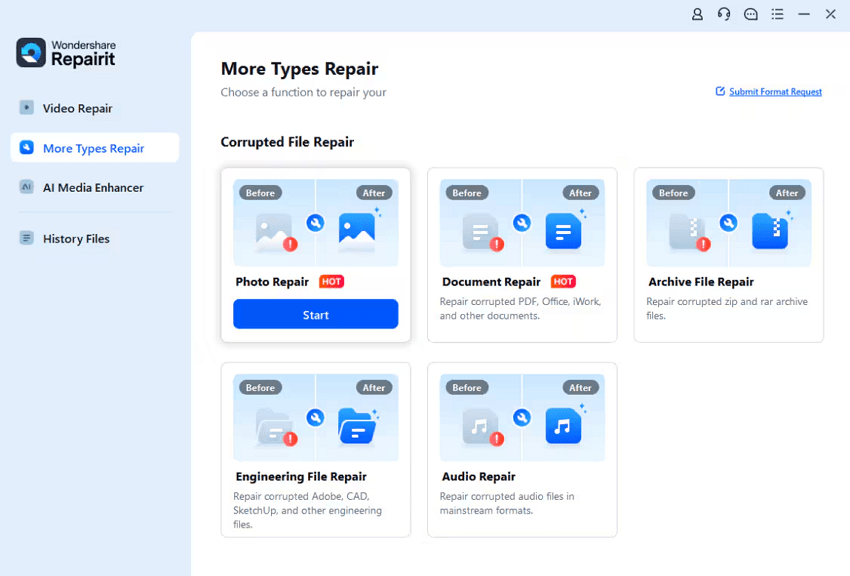
Select the “Photo Repair” feature from the homepage and click on the “Start” button to begin. Now, import the corrupted or damaged pictures to the tool’s interface.
Step 2. Repair Selected Photos
Once the photos are added to the tool’s interface, click on the “Repair” button located at the bottom to execute the process.
Step 3. Preview Results and Save
When the process is completed, click on the “Preview” button to analyze the repaired photo. Finally, hit the “Save” button to export the picture to your device.
Solution 2. Try an Image Editor
Another solution for Fujifilm camera repair is to use an online image editor. These tools provide the utility of repairing the corrupted file, keeping the details intact. PhotoBooth is one such online image editor that allows users to repair and restore images with only a few clicks. Provided below are the steps for using this tool to fix the photos:
Step 1. Begin by accessing the tool on your web browser and add the corrupted file using the “Upload Photo” button. The tool will instantly begin the repair process as soon as you add the picture.
Step 2. Once the process is completed, click on the “Download” button to successfully save the results to your device.
Solution 3. VLC Repair for RAF Files
Converting the file format using VLC Media Player is one of the photo repair solutions you can use to repair corrupted RAF files. This multimedia player provides the utility of converting file formats without affecting the quality. You can then save and preview the results within the tool interface effortlessly. To learn how to use this tool for format conversion from RAF to any other, read the steps mentioned below:
Step 1. Start by heading to the “Media” option from the toolbar and clicking on the “Convert/Save” option.
Step 2. Click the “Add” button to import your RAF file and press the “Convert/Save” button at the bottom.
Step 3. Now, choose the conversion format and press the “Browse” button to select the output destination.
Step 4. Once done, press the “Save” button to successfully save the converted file.
Part 3. What If the Issue is With the Camera? How to Fix Your Fujifilm Camera
If the image corruption issue is with the camera, you can try the following quick Fujifilm image fixes to resolve it instantly:
Solution 1. Update Firmware
One of the authentic methods to fix the camera issue is by updating the firmware offered by the camera company. Manufacturers regularly release firmware updates to fix bugs and improve camera performance. Keeping your firmware up to date minimizes recording errors and reduces video corruption. Read the steps mentioned below to learn how to update the firmware of your camera:
Step 1. Turn on your camera and navigate to the setup to check the firmware upgrade, and press the “OK” button to begin the process.
Step 2. Head to the official site of Fujifilm and check for the updates by clicking on the “Download Software & Firmware” option.
Step 3. In the following interface, click the “Begin Download” button to save the firmware update to the SD card.
Step 4. Now, head to the firmware upgrade camera settings and press the “OK” button to execute the process.
Solution 2. Troubleshoot Common Issues
When facing issues with a Fujifilm camera that result in photo corruption or poor image capture, basic troubleshooting should be the first step. This includes checking that the memory card is genuine, undamaged, and formatted correctly in the camera to avoid read/write errors. Ensuring the battery is fully charged also helps prevent sudden shutdowns during shooting and helps in photo repair.
Solution 3. Reset Camera
Resetting the Fujifilm camera to factory settings can clear out glitches or misconfigurations that cause malfunctions. This reset process restores all settings, including image quality and shooting modes, back to their original defaults, effectively giving the camera a fresh start. It can resolve unexpected behavior without affecting the camera’s firmware itself. Here is how you can reset the camera to its factory settings:
Step 1. Start by accessing the “User Settings” on your camera and locating the “Reset” option to click on it.
Step 2. Next, press the “Set Up Reset” option from the options provided in the expanded list.
Step 3. In the following screen, press the “OK” option to the confirmation message appearing on the screen. This will instantly begin the factory reset process for your camera.
Solution 4. Consult Manuals and Support
For persistent problems or hardware faults, consulting the official Fujifilm images user manual is essential for detailed troubleshooting advice tailored to specific camera models. Online support forums, FAQs, and Fujifilm’s customer service can provide expert guidance and diagnostics. If hardware-related issues like sensor damage or mechanical faults are suspected, contacting authorized Fujifilm service centers is recommended to ensure professional repair using genuine parts.
Conclusion
To sum it up, this article discussed how you can perform Fujifilm camera repair using the proper techniques. However, one of the best resources that offers photo repair is Repairit. The tool uses advanced AI to detect and repair damage in your media files with a 99.5% success rate.
Leave a Reply